Vellum Writing Software: Should You Get It? [Features and Pricing]Authors and publishing professionals often spend hours manually formatting files for e-book and paperback production. Vellum is a software system made to handle the complexities of formatting and speed up the process. In this review, I cover Vellum pricing, features, and the types of people who should use it. See if it's a fit for you.  Vellum software - is it worth the price?In brief, if you're responsible for creating multiple e-books or paperbacks for Amazon KDP or other publishing platforms, whether your own or those of a client, then Vellum is worth the one-time cost, which is $199.99 for e-books, and $249.99 for e-books and paperbacks. Fortunately, Vellum offers a free trial. If you'd like to see for yourself how it can speed up the file-preparation process, download Vellum for free and use it to create some files. You'll only be required to pay if you decide to export the files for publication. Consider the value or your time $249.99 isn't cheap. However, creating publication-ready files without the help of software can take a long time. If you only need files for one book, buying Vellum may not be right for you. However, if you're responsible for multiple projects, Vellum's one-time cost is a worthwhile investment. Hypothetically, let's say your time is worth $25.00 an hour (possibly it's worth way more than that). So, if Vellum can save you 10 hours of time, it's just paid for itself. Manually building files for multiple books can easily take 10 hours. Consider the value of your book sales A poorly formatted book can be disastrous for sales. People browsing it may decide not to buy, while people who do buy yet don't like the page design, would be less likely to recommend your book to a friend. An e-book may sell for $4.99 and a paperback for $14.99. So, if you can just sell just 15 additional copies in each format, you'd already earn back what you spent on Vellum. What is Vellum software?Vellum software is a tool writers and publishing professionals can use to format manuscripts into e-book, paperback, or hardcover files ready for inclusion on retailer sites like Amazon, iBooks, Kobo, Barnes & Noble, and Google Play. File formatting for books can be quite complex, with requirements for word spacing, chapter breaks, page-margin dimensions, and more. Without software, these tasks can be tedious and time-consuming. Plus, if you happen to make an error, your upload to a retailer site can be rejected, forcing you to start over. Vellum was created to save you time and hassle with the book-production process. 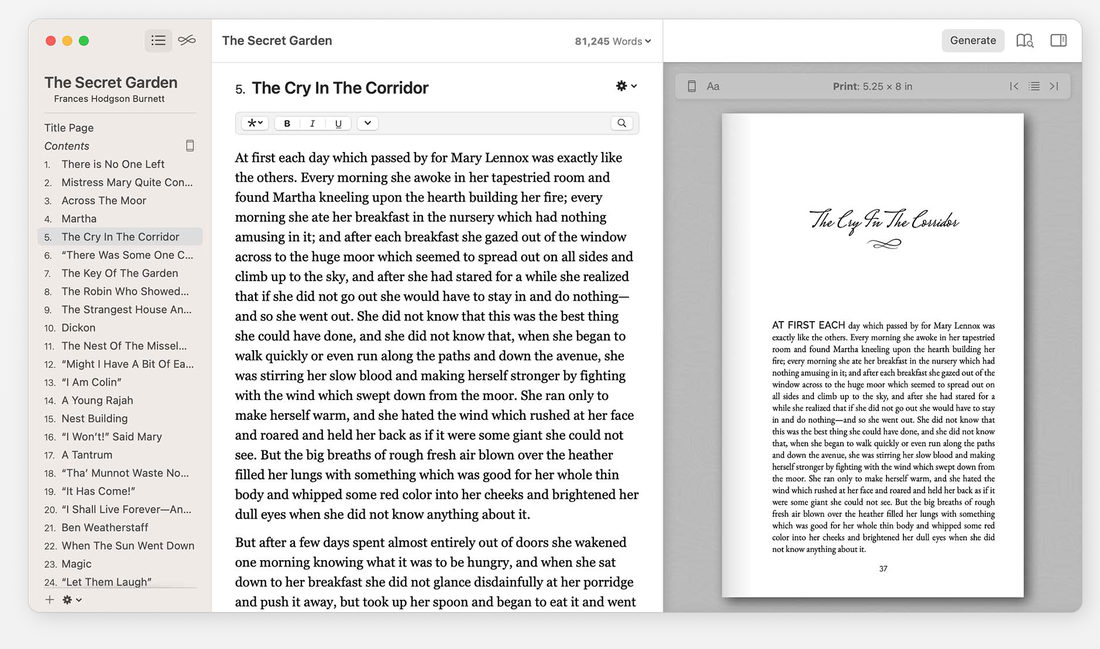 Who is Vellum software for?Vellum is primarily used by three types of people:
If you're a publishing-company employee or freelancer, you very well could be taking on multiple formatting projects a week. Doing all of them manually seems ludicrous - you'd surely benefit from a tool like Vellum. If you're a self-published author formatting your own files, even on a single project, you'd feel the benefits of automating the process. If you plan to self-publish multiple books, the benefits of leveraging software would be even greater. Not sure if Vellum is right for you? They offer of a free trial. Check it out on their website: How does Vellum software work?
Vellum and cover filesVellum is a file-formatting tool, not a cover-design tool. Whether you're creating an e-book, physical book, or both, you will need a cover file before you can sell copies on Amazon and other retailers. Cover-design projects for e-books involve the creation of a rectangular image that matches the dimension requirements of retailers. Cover-design projects for paperbacks are more involved, particularly because of the book spine. The width of the spine is dependent on the number of printed pages your book will have, which is dependent on its length, trim size, and interior spacing. Once you produce a file for your physical book's interior in Vellum, a cover designer should be able to use the page count to appropriately size the spine. From there, a spine design can be created, plus a back cover. When uploading files to Amazon KDP for paperback printing, you will need an interior PDF (which you can generate in Vellum), plus an exterior PDF for the front and back covers and spine. I'd recommend you work with a professional graphic designer on the exterior PDF versus trying to make it yourself. If you need a good cover designer at a good price, check out the freelancers on Fiverr. Vellum pricing
Vellum alternativesFor e-book creation, you can find other software tools that are cheaper than Vellum. However, they may lack Vellum's styling options and ease of use. As for physical-book creation, not many other software systems can do what Vellum does. As a self-published author, you also have the option to work with a self-publishing partner firm, which will handle e-book and paperback formatting for you. Though this option may be easier than creating your own files with Vellum, it may not be as cheap. Over time, if you plan to publish many books, a one-time cost for Vellum could be considerably less than the accumulating total you'd be paying a firm for file-formatting services. The same is is true for freelancers who offer formatting services - this option may be easier, but pricier. If you'd like to look into, here are some freelancers on Fiverr. Vellum software - frequently asked questionsHow much does Vellum cost?Vellum costs a one-time fee of $199.99 for its Ebooks version, and $249.99 for its Press version, which lets you design files for e-books and physical copies. You can download Vellum for free to try it. Is Vellum a one-time purchase?Yes, Vellum is a one-time purchase. You won't be required to pay for a subscription or updates. The version for just e-books is $199.99, and the version for e-books and physical copies is $249.99. Is Vellum free to use?Vellum is free to use for designing book files, however, to export those files for publication, you'll need to purchase the software. You can buy Vellum for a one-time fee, which ranges from $199.99 to $249.99. What is the best software to design a book?Vellum is widely considered the best software to design a book. With Vellum, you can easily create nice-looking interior files for e-books and physical books. It handles spacing, chapter breaks, page-margin dimensions, and more. Does Vellum work with Scrivener?Yes, Vellum does work with Scrivener. Once you're done writing a manuscript with Scrivener, you can use the "Vellum Export" option to create a Word version that's compatible with Vellum. Simply import this file into Vellum. Try Vellum todayIf you aren't yet sure Vellum is right for you, I recommend you at least take advantage of the free trial on Vellum's site. If you're convinced Vellum is right for you, then buy your license on the site, today. If you're an author looking to streamline other aspects of your marketing, you should check out these other tools available to you. This post contains affiliate links.
0 Comments
Leave a Reply. |
 RSS Feed